Hexidor
Learn all about this game.
Hexidor is a custom two-player strategy game inspired on the popular board game Quoridor, played on a hexagonal field. We tried to keep it as simple and minimalistic as possible. Here's everything you need to know.
Objective
The objective of Hexidor is to be the first player to reach the opposite side of the board, while slowing down your opponent by placing walls in their path. That's it.
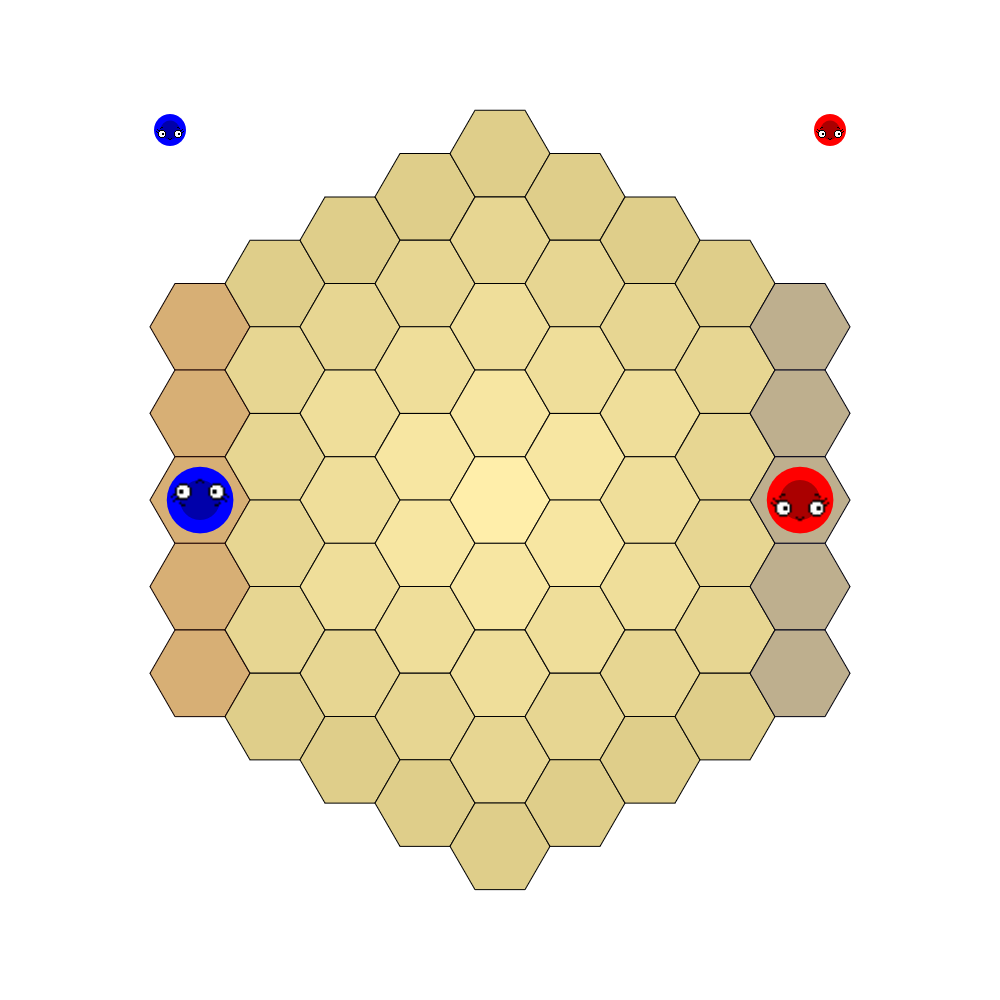
Preview of the Arena
Gameplay Mechanics
- Two players each control a character (those round colorful thingies with cute eyes) on a hexagonal field containing 61 tiles.
- Players start at the center of opposite sides of the field. Your goal is the side you started opposite to.
- The game is turn-based: on your turn you either move to an adjacent tile, or place a wall.
- You can leapfrog straight over the other player: if they occupy an adjacent tile, you may move to the free tile directly behind them.
- Each player has 16 walls. A wall covers 3 tile edges in a zigzag pattern.
Rules
- You cannot move through a wall: no crossed edge of your path (including the far edge when leapfrogging) may be blocked.
- Walls must be placed anywhere on the board, not only near your character, but must stay fully on the field, may not overlap existing walls, and may never make it impossible for your opponent to reach their goal side.
- Every player has a 60 second turn clock. It only counts down while it is your turn, and it never refills: it is a budget for the whole game. If your clock reaches zero, you are eliminated and your opponent wins.
- You may keep your bot computing during the opponent's turn, but you can only act (move or place a wall) on your own turn.
- The first player to step onto any tile of their goal side wins the game.
Technical Requirements
- Participants must submit their bot as a single code file with a maximum size of 100KB. You may upload as many bots as you like, though only one can be active at any time.
- Bots may not crash. If the execution of your code file exits during your turn without having acted, your bot is eliminated.
- An illegal action (moving into a wall, placing an overlapping wall, acting out of turn) also eliminates your bot.
Example Gameplay
You can take a look at the livestream here or the replay videos of past games to get an idea of how the gameplay of Hexidor looks.
You can also play around with your bots in the web editor!
Detailed Description
Below, you'll find some more detailed information about various aspects of the game. You don't necessarily need to know these in order to start writing your bot, but they will be useful if you plan on optimizing your algorithm to get the most out of your bot.
- Game field
- The game is played on a hexagonal game field with a total of 61 tiles. There are 5 tiles on every edge of the field. Tiles use axial coordinates (q, r) with the center of the field at the origin: both q and r range from -4 to 4, with the constraint that |q + r| is also at most 4.
- Starting positions
- Player 0 starts at (q, r) = (4, -2), the center of the right side, and must reach column q = -4. Player 1 starts at (q, r) = (-4, 2), the center of the left side, and must reach column q = 4. Reaching any tile of your goal column wins the game.
- Moves
- A move goes to one of the 6 adjacent tiles, or straight over the opponent's tile to the free tile behind them (leapfrog). No wall may block any edge you cross. Moving onto the opponent without leapfrogging is not allowed.
- Walls
- Each player has 16 walls. A wall consists of 3 connected tile edges in a zigzag pattern: a center edge, with one more edge attached to each end, bending to opposite sides (never a C shape). You specify a wall placement by naming the center edge (one tile + one of its 6 directions) and the zigzag orientation (0 or 1). Walls may be placed anywhere on the board in any legal spot: fully on-field, not overlapping existing walls, and never sealing your opponent off from their goal side.
- Clocks
- Each player has 60 seconds of turn time (300,000 ticks) as a budget for the whole game. The clock counts down only while it is your turn and never refills. When you act, the turn passes and your opponent's clock (which held still during your turn) starts running. Running out of time during your turn eliminates you.
- Tick system
- The game runs on a tick-based system at 5,000 ticks per second. Every tick, each living player's bot code advances by one statement, also while it is not their turn. Every function your bot calls has a tick cost: the bot pauses that many ticks. Time spent executing statements during your turn counts against your turn clock.
Tick costs of game functions:getPlayerId(),isMyTurn(),getTurnNumber(),getTick(),getStartInfo(): 1 tickrelToAbs(),directionRelativeToMe(),getStepsToGoal(),absToRel(),directionMeToRel(): 5 tickscanPlaceWall(),getWalls(),getTimeLeft(),canPlaceWallRel(): 10 ticksgetTileAbs(),getTileRel(),getWallAbs(),canMove(),canMoveRel(): 20 ticksgetPlayerInfo(): 50 ticksgetSurroundings(),getSurroundingsRel(): 100 ticksmakeMove(),placeWall(),moveInDirection(),moveInDirectionRel(),placeWallRel(): 1,000 ticks
Coordinate Systems
Absolute coordinates (q, r)
Every tile has fixed axial coordinates (q, r), with (0, 0) at the center of the field. The q axis runs to the lower right (30 degrees below horizontal: the down-right direction); the r axis runs straight down. The third cube coordinate s is implied by s = -q - r and runs straight up. A tile is on the board when |q|, |r|, |s| <= 4. Functions like makeMove, getTileAbs and placeWall work in this frame. Your goal is a fixed column: q = -4 for player 0, q = 4 for player 1.
Directions
The six neighbours of a tile are numbered 0-5: 0 up, 1 up right, 2 down right, 3 down, 4 down left, 5 up left. These are the dir arguments of canMove, moveInDirection and getWallAbs.
Relative coordinates (your bot's frame)
Your bot also has a facing: the direction of your last move. In the relative frame, your bot's tile is the origin (0, 0), the q axis points to your right, and the r axis to your back left. The frame rotates with your facing: after a turn, the coordinates of every tile around you change, but “straight ahead” stays the same. The ...Rel functions (getTileRel, canMoveRel, placeWallRel, ...) all take this frame, as does relToAbs/ absToRel for converting. Relative directions relDir 0-5 count clockwise from straight ahead: 0 forward, 1 forward right, 2 backward right, 3 backward, 4 backward left, 5 forward left.
Hover a tile to inspect it. Click a tile to move the bot there; the six dark arrows set its facing. In Relative to bot mode every tile shows its (q, r) in the bot's own frame (the one used by getTileRel, placeWallRel, ...). The white numbers on the six neighbouring tiles are their relDir for canMoveRel / moveInDirectionRel: 0 forward, 1 forward right, 2 backward right, 3 backward, 4 backward left, 5 forward left.
Game-specific Functions
Here you find an extended description of the game-specific functions available in Hexidor, grouped by what they are for.